



If 2026 taught me anything, it’s that there’s a QR code for everything.
I generated countless QR codes for client projects, business cards, coffee payments, and even for my friend’s wedding invitation.
Thanks to working with diverse client budgets and goals, I was able to use various QR code generators as well. Some of them truly impressed me with their versatility. Others, let’s say, got the job done.
I’ve rounded up the best QR code generator software I’ve tried and tested, and I’ll tell you what I loved (and didn’t) about each!
1. QR TIGER
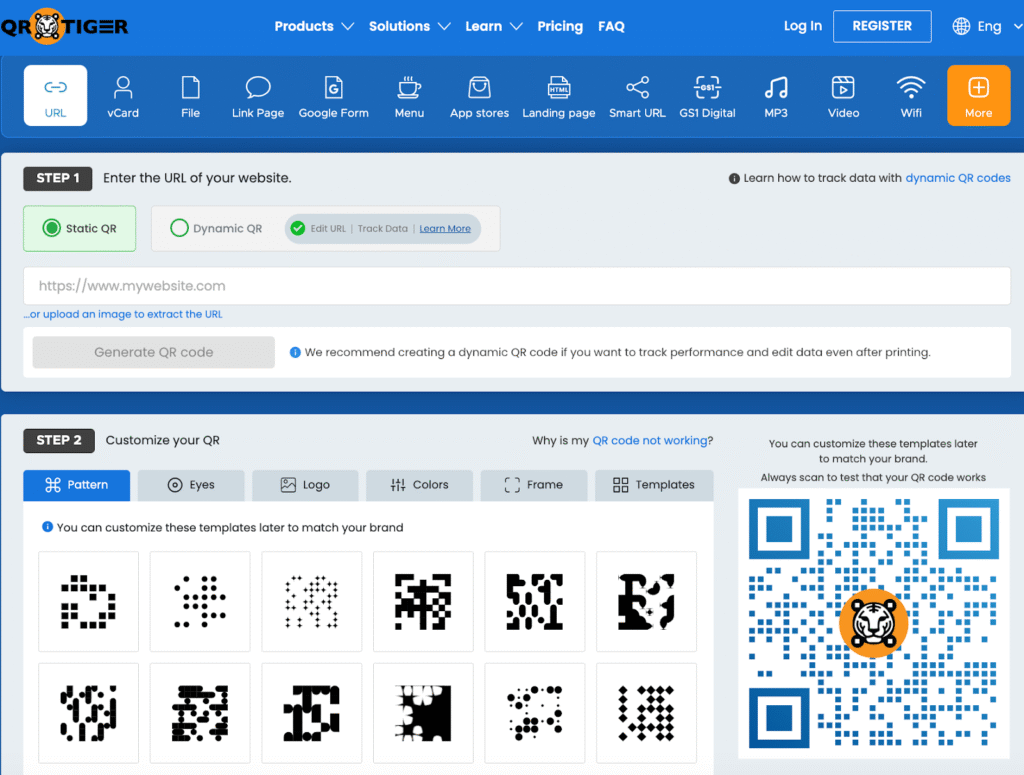
Based on my research, I found that QR TIGER is a highly-rated platform on the market. Hundreds of reviews on trusted software review sites hooked me, so I tried it, and it is one of the best dynamic QR code generator I’ve ever tested out. I can vouch for it.
Having been on the market since 2018, their wide solutions and advanced features are solid proof that they’re constantly improving to meet customer needs.
Pros
- The 24/7 support is super convenient. I can get help anytime when sudden issues happen.
- There are no complicated steps when creating a QR code. Users can customize the code based on their personal or brand preferences.
- Dynamic QR codes are editable, trackable, and packed with advanced features like retargeting and white labeling. These saved me big time from using other tools.
- Its focus on privacy feels reassuring, especially for someone like me who is cautious about cybersecurity.
- GDPR compliant and ISO certified, proving it’s a secure and well-developed software.
- Offers API integration and works easily with tools like Canva, HubSpot, and Zapier (a big plus if you already use these tools).
- Its recent software updates show that the team understands the needs of its users.
Cons
- Some pre-designed templates and frames are available only on paid plans.
For me, it stands out as the best paid QR code generator for those seeking quality and functionality.
Pricing
The plan starts at $7 per month.
Best for
QR TIGER is software that brands, event organizers, and marketers can fully maximize for any kind of project. It’s great for producing high-quality custom QR codes that don’t compromise scannability.
2. Free QR Code Generator
The Free QR Code Generator is an effective solution to create QR codes suitable for lead generation, marketing and maximizing sales.
Pros
- It is one of the best free QR code generators that let users create non-expiring, customizable QR codes with no sign-ups, no fees, and no expiration limits.
- The platform is quick and easy to use.
- It allows you to create a professional-looking QR code in no time.
- With no expiry QR codes, your texts or links that lead to your digital menu, file, and social media page stay active forever. Once generated, the codes remain accessible for as long as you need them.
- This platform also has a mobile-friendly interface.
- It offers a range of QR code solutions.
Cons
- If you need dynamic, editable QR codes, you need to sign up for another site.
Pricing
There are no fees needed when using this generator.
Best for
It’s a strong pick if you’re a freelancer, small business owner, or part of a large team who want to create non-expiring QR codes or for payments like SEPA.
3. QRStuff
When I tested this platform, I found that numerous prominent global brands use QRStuff.
Pros
- Users can create any type of QR code using this software, as it supports over 20 data types (e.g., PDF, WiFi, URL), allowing versatile QR code creation.
- I found that QRStuff generates high-resolution QR codes (up to 3000 pixels and 300 dpi), which will make your designs crisp for posters, packaging, or print campaigns.
- Offers artwork-quality QR codes through integration with the Zazzle print-on-demand website.
- If you worry about your technical skills, don’t. QRStuff has a well-organized dashboard that is extremely easy to navigate, even for new users.
- Provides multiple payment plans with varied packages to suit different needs and budgets.
- Allows customization and creation of dynamic QR codes without the need for a URL shortener.
Cons
- Despite its advanced capabilities, I found that QRStuff offers limited software integrations.
- The platform integrates with Slack, a tool now widely used in most workspaces. However, using this integration feature requires a basic understanding of the Slack API.
- If you have a general understanding of RESTful APIs, you will find it easier to manage QRStuff–Slack API requests and responses effectively.
Pricing
The plan starts at $10 a month.
Best for
QRStuff works well for educators, non-profit organizations, and users who require a clean and dependable solution.
4. TIGER FORM
TIGER FORM is a QR code generator that allows you to create QR-powered digital forms.
With just a scan, respondents can open your form, where they can complete surveys, provide honest feedback, fill out registration forms, or participate in quizzes and polls.
Pros
- Best platform to create an online form and a QR code for quick sharing and access.
- Quick-response digital forms are a fun and interactive element that can enhance people’s curiosity. It will encourage them to scan and fill out the form.
- Traditionally, paper-based forms required printing, making these digital methods an eco-friendly alternative.
- It offers full QR code customization, advanced tracking features, 24/7 customer support, and an uninterrupted system.
- Save time by using the AI form builder. I can quickly generate forms with just a detailed prompt
Cons
- Focuses on creating QR code forms alone
- Dashboard looks good, but could be better, especially the submissions board
Pricing
Its plan starts at $16 per month.
Best for
TIGER FORM is best suited for organisations that need a robust, enterprise-grade form and workflow solution.
Also, this platform is suitable for researchers conducting surveys and distributing questionnaires.
5. GS1 QR Code Generator
As the name suggests, the GS1 Digital Link QR code allows you to make QR codes that contain a barcode. You can use it to lead customers to product pages, apps, or files. You may also opt to accompany it with a linear barcode.
Pros
- QR code created using this generator will contain all the product details you need to know, such as batch number, serial number, expiration date, brand information, and more.
- During my research, I found that this is the only platform that provides a 1D barcode within a QR code.
- By creating code using this software, you can ensure that your code is compatible with any scanning device.
- In comparison with other generators, using the GS1 Digital Link allows me to create codes with a higher data capacity. This is its massive strength.
Cons
- I’m new to GS1 QR codes, so there’s a bit of a learning curve (but their complete guide was extremely useful for someone like me).
Pricing
Its starting plan is $18 per month.
Best for
This platform is ideal for manufacturers and retailers who manage complex supply chains. It helps teams maintain accurate product data and ensure every item stays traceable from factory to shelf.
6. QRCodeChimp
QRCodeChimp’s software offers a variety of features. For instance, with this software, you can create templates that you can edit at any time. It also enables advanced tracking, which will be particularly helpful for your large-scale campaigns.
Pros
- QRCodeChimp is a user-friendly platform offering a wide variety of customization options.
- In my opinion, this platform’s most standout feature is design flexibility, making it ideal for visually focused projects.
- If you care about design as much as function, you’ll love its built-in templates.
- QRCodeChimp goes beyond basic QR codes. I tested and found that it supports features like dynamic QR codes, which can provide scan tracking, editing, and advanced analytics.
- With this software, you can also create QR codes in bulk, which will be helpful when you plan massive campaigns.
- The QR code landing pages are mobile-friendly, ensuring a seamless experience for users scanning with smartphones.
Cons
- One of the shortcomings of this software is that custom QR code shapes and extreme color changes can sometimes reduce scannability.
Pricing
Plans start at $6 a month.
Best for
This free editable QR code generator solution is ideal for marketing teams or agencies that need more control over QR aesthetics and campaign organization without opting for an enterprise plan.
7. Flowcode
Flowcode is a QR code software that I consider as a premium platform offering customization and analytics capabilities.
Pros
- The Flowcode software allows you to create multiple QR codes via API integration for large-scale campaigns.
- They offer customization options and customer support, which will be helpful for you. This platform provides lifetime scans as part of paid plans.
Cons
- The API integration and documentation process of FlowCode could be clearer. It works well once set up, but expect some initial troubleshooting.
- The most distinctive customization features are only available under paid plans.
Pricing
Plans start at $25 a month.
Best for
Flowcode is more useful for individuals and businesses that want simple yet reliable QR codes.
8. Scanova
Scanova’s QR code generation tool is easy to use. It has robust customization and exceptional customer support, making it simple to create and brand QR codes.
Pros
- It’s an intuitive, easy-to-navigate interface for creating and managing QR codes.
- It also offers extensive options for customizing QR codes, including the ability to add logos and colors that match your branding.
- This software features advanced tracking and analytics, strong security compliance, and excellent customer support.
Cons
- The pricing plan of Scanova is a bit higher if you need more features
- This software also lacks adequate white labeling options.
Pricing
Scanova’s plan pricing starts at $5 a month.
Best for
After testing this platform, I recommend it to large companies and marketing agencies. The QR codes created using Scanova have advanced security and extensive campaign management capabilities.
9. The QR Code Generator (TQCG)
The QR Code Generator, also known as TQCG, is a web software that allows you to create professional QR codes for small business needs.
Pros
- TQRCG software features a simple and compact interface, which makes it easy to create QR codes in seconds.
- When you own a small company, investing money to create professional QR codes for your brand might not be affordable. That’s where this platform comes in.
- It allows you to create QR codes that maintain your brand image for small-scale purposes.
- The platform also offers deep QR Code tracking data for performance analysis and responsive customer service for troubleshooting.
Cons
- Unlike other QR code generators, TQRCG doesn’t offer a wide range of QR code types, and its design options are limited.
- Furthermore, one of the downsides of his software is that it doesn’t support bulk QR code generation and lacks enterprise security.
Pricing
Its lowest plan starts at $5 a month.
Best for
The TQRCG software is suitable for you if you are an individual who owns a small business and needs a QR code with limited use cases.
10. QR Planet
QR Planet is a versatile QR code generator software that offers automation features and real-time analytics for campaign tracking and management.
Pros
- This software can generate various types of QR codes, including URL, Wi-Fi, vCard, SMS, and more.
- The automation and integration tools offered by QR Planet’s software will highly benefit your campaign management.
- The software offers advanced analytics tools, customization options, and is user-friendly.
Cons
- One of the major shortcomings of QR Planet is that, when generating a QR code, I found certain features on the dashboard to be confusing.
- I also felt that the platform design needs improvement, and the analytics dashboard requires an update for easier understanding.
Pricing
Starts at $5/ 5/month
Best for
QR Planet is best for businesses and organizations that need high reliability and stability, and marketing teams or firms that run multiple campaigns and want advanced analytics and tracking.
My best QR code generator software choice
After thoroughly testing and comparing features and pricing plans, the QR code generator that ultimately won me over was QR TIGER.
It quickly became my top choice for the best free QR code generator in 2026 because I’m able to maximize all of the QR codes to their fullest potential across various projects.
It’s also worth investing in because it already comes with tools I usually need from another platform.
If you’re still struggling to choose from the many options available, I highly recommend QR TIGER.
Feel free to experiment with other platforms as well, so you’ll see for yourself which one best fits your workflow and creative goals.
FAQs
1. Which dynamic QR code generator software is best for editing links and tracking scans in 2025?
QR TIGER is the top-rated choice for 2025, offering robust URL editing, retargeting, and seamless integrations with HubSpot and Zapier. It is preferred for its 24/7 support and ability to track scans precisely for marketing campaigns. QRCodeChimp is a strong alternative if you prioritize unique design templates over enterprise API features.
2. Are there any free QR code generators that create non-expiring static codes?
Yes, the Free QR Code Generator allows you to create static codes that never expire without requiring sign-ups or subscription fees. It is ideal for permanent uses like digital menus, ensuring your content remains accessible forever. However, note that unlike dynamic codes, you cannot edit the content once these static codes are generated.
3. What is the most secure QR code generator software that is GDPR compliant and ISO certified?
QR TIGER is the safest option, fully ISO certified and GDPR compliant, making it ideal for brands and enterprises handling sensitive user data. It provides “no fluff” privacy protections to safeguard against cybersecurity threats. Scanova is also a reliable runner-up for large companies requiring strict security compliance.
4. How can I create a GS1 Digital Link QR code for product supply chain tracking?
You should use the GS1 QR Code Generator, which uniquely embeds a 1D barcode within the QR code for full supply chain compatibility. This allows manufacturers to track items from factory to shelf using standard scanning devices. It enables the storage of critical product data like batch numbers and expiration dates directly in the code.
5. Which QR code platform is best for creating digital forms and collecting customer feedback?
TIGER FORM is the best dedicated software for generating QR-powered digital forms, surveys, and polls to replace traditional paper methods. It features an AI form builder that creates questionnaires from prompts, saving significant setup time. This tool is perfect for organizations needing an automated, eco-friendly workflow for data collection.