


Visuals are the most direct way for your brand to communicate.
Your audience decides within seconds whether to engage with your brand, so every image must capture attention while staying true to your identity. Meeting this demand requires more than creative talent; it requires efficient systems that connect strategy, design, and execution.
Freepik AI Image Generator can help you meet this challenge.
This AI-powered tool enables you to generate, refine, and deploy visuals at scale within the ecosystem. It surely accelerates production cycles, and ensures creative output aligns with your brand direction.
We’ll examine the generator’s capabilities, competitive advantages and how you can use it to simplify and accelerate visual production. AI never looked so professional, so let’s dive right in.
Platform Overview and Business Applications
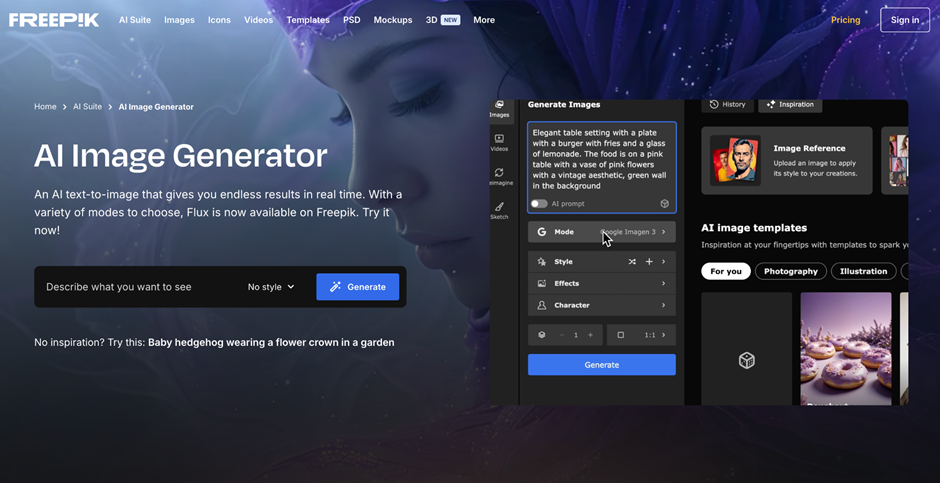
Freepik AI Image Generator can convert text instructions, sketches or reference images into original visuals. It supports creative workflows across marketing, outreach and product design. This tool helps you deliver consistent results while preserving your design capacity. A simple prompt can generate a polished image ready for deployment across formats and channels.
Multiple input options
You can start from a detailed text instruction, a hand-drawn sketch or an existing photo to create unique assets or variations. Upload a product photo, and generate an illustrated version in your brand colors to use in newsletters, landing pages or slides.
Style Control and Format Flexibility
The tool offers adjustable styles, such as photo, 3D, cartoon and digital art, as well as multiple aspect ratios for quick adaptation to different platforms.
Built-in Editing and Upscaling
After you generate an image, you can erase backgrounds, upscale to higher resolutions, and make fine adjustments all within the platform.
Commercial Use License and Asset Integration
Paid plans include commercial rights, and the generator connects directly to it’s extensive library of templates, photos, and vectors. Rest assured, the assets are licensed for professional use and compatible with their broader creative tools.
It also enforces content safeguards unlike some niche nsfw ai image generator tools, Freepik’s workflow includes moderation and policy checks to reduce inappropriate outputs. If you need a quick description-to-image path, it complements dedicated ai image description generator utilities by turning text inputs into production-ready visuals while keeping content compliance in mind.
The uniqueness of Freepik AI Image Generator
Freepik’s is one of the few designed with business scalability in mind. Its approach centers on reliability and integration:
● Unified Workflow: Creation, editing, and asset management all take place within the same interface, so you can work without switching tools.
● Brand Alignment: Saved prompts, color palettes, and style presets maintain a uniform look across campaigns.
● Volume Efficiency: Ideal for teams producing multiple versions of each visual for testing and localization, it’s optimized for fast iteration.
● Commercial readiness: Built-in licensing and access to a complete asset ecosystem transform it from a creative experiment into a professional-grade solution.
When you compare available tools, some teams pair Freepik with other engines like the Bing AI Image Generator or the Adobe AI Image Generator for specific stylistic needs, while developer-centric APIs such as DeepAI may be used for custom pipelines. Each option has trade-offs in style control, integration and licensing. It emphasizes a complete creative stack for marketers and designers.
Pricing and decision factors
● Free: You can generate up to about 20 images each day, which lets you evaluate its capabilities.
● Paid plans include: They include higher-resolution downloads, commercial use rights, and, in some tiers, unlimited image generation.
● Strategic Value: Your cost depends on your monthly visual output. For teams producing a high volume of images, the unlimited tier often yields a strong ROI through time savings and faster approvals.
If you’re hunting promotions, keep an eye out for a promo code or seasonal discounts to test paid tiers at a lower cost. When you calculate value, consider lighter designer workload, shorter campaign cycles and consistent brand visuals produced directly within the platform.
Real-World Uses for Freepik AI Image Generator
Its flexibility makes it a valuable asset for marketers, designers and outreach teams:
● Social media: the generator lets you quickly create multiple post variations, adapting each visual to specific channels and formats. Style presets and color adjustments help you keep every piece aligned with your brand identity while maintaining a steady content flow.
● Visual A/B testing for campaign optimization: teams can experiment with color tones, compositions, or themes, analyze performance metrics, and refine prompts to guide future campaigns based on real engagement data.
● Polished visuals for slides, proposals, and client materials: elevating the visual appeal of any pitch or report.
● Scalable content localization: adjusting imagery to reflect cultural nuances, environments, or diverse audiences helps you stay relevant across markets while reusing design work.
● Visual library for long-term use: generate a set of visuals that embody your brand’s aesthetic, such as product imagery, team scenes, or abstract backgrounds, and you’ll build a foundation of ready-to-use material that accelerates future campaign production.
● Prototyping and concept visualization: you can generate realistic visual drafts of packaging, web layouts, or creative concepts, gather feedback early on, and efficiently refine ideas, saving time and resources.
● Brand storytelling: defining prompts that reflect brand themes, such as innovation, diversity, or sustainability, allows you to produce visuals that reinforce your narrative and create a deeper connection with your audience across campaigns and content platforms.
If you’re evaluating many engines, you might test Freepik alongside smaller or experimental tools such as ai image generator perchance for creative ideation, or compare output from Deepai when building backend image-generation prototypes.
The Road Ahead
Freepik AI Image Generator represents a shift in how creative teams operate.
It transforms image production from a manual process into a scalable, strategic function. Professionals like you can now test more ideas, iterate faster and align creative work with business outcomes, all from a single platform.
Its greatest advantages are speed and creative autonomy.
Teams can transition from inspiration to the final visual while staying self-sufficient, because they no longer need external resources or lengthy design cycles. The built-in commercial license and integration with the Freepik ecosystem further streamline operations, ensuring that every asset is compliant and brand-consistent.
In a market where adaptability drives growth, tools like this help you stay visually relevant.
Frequently Asked Questions (FAQ)
What is Freepik?
Freepik is a creative asset platform offering photos, vectors, icons, templates, and an AI image generator for quick visual production. It combines a searchable library with commercial licensing options, making it useful for marketers, designers, and agencies who need brand-ready assets and integrated editing tools.
Freepik AI Image Generator — how to use?
To use Freepik AI Image Generator, log into your Freepik account, choose the AI generator, enter a clear text prompt or upload a reference image, select style/aspect ratio, and generate variations. Refine with built-in editing (erase, upscale, color adjust), save prompts, and export under the paid plan for commercial use.
What AI image generator has no restrictions?
There are few reputable services with truly “no restrictions”; most commercial generators enforce content policies to prevent misuse. Open-source models may allow broader outputs, but they carry legal and ethical risks — evaluate licensing, moderation, and compliance before using any model without content filters.
How to prompt an AI image generator?
Write prompts that combine subject, style, lighting, composition, and mood (e.g., “minimalist product photo, softbox lighting, high contrast, white background, shallow depth of field”). Add camera/format details for realism and iterate—small prompt edits produce predictable changes, which speeds up high-quality results.
How to use an AI image generator with a text prompt?
Start with a short concept sentence, add 3–5 descriptive modifiers (style, color palette, lighting, perspective), and end with output constraints (aspect ratio, resolution). Save prompt templates and use negative prompts to exclude unwanted elements; test and refine until the output matches brand standards.
How to run an AI image generator locally?
Choose a compatible model (open-source checkpoint), ensure a capable GPU (or use CPU/quantized builds for low-spec machines), install dependencies (Python, CUDA or CPU builds, model runner like AUTOMATIC1111 or a container), and follow the model’s license and safety guidelines. Maintain updates, use quantization to reduce memory, and monitor resource limits for stable local inference.